
HP 15.6 Portable Laptop
4.1Editor score
Intel Quad-Core N200 Processor
128GB Storage SSD
Numeric Keypad Included
Compare the best laptops with 10 keypad for business and home use. This guide reviews top models featuring numeric keypads for Excel and data entry tasks.
Finding a laptop with a dedicated numeric keypad simplifies data entry and spreadsheets significantly. Whether you manage finances or handle large datasets, a full-size keyboard with a ten-key layout boosts productivity and reduces input errors during long work sessions.
We evaluated ten top-rated laptops that include a numeric keypad to help you find the right tool. Our comparison covers screen size, processor performance, memory capacity, and connectivity options to ensure these machines handle professional workflows efficiently.
Each pick below highlights key strengths and ideal use cases for students and professionals. Prices and availability change frequently so verify the latest details before purchasing to ensure you get the best value for your specific computing needs today.
4.1Editor score

4.5Editor score

4.3Editor score
This side-by-side comparison highlights the core specifications of each laptop to help you decide which model fits your workflow best.


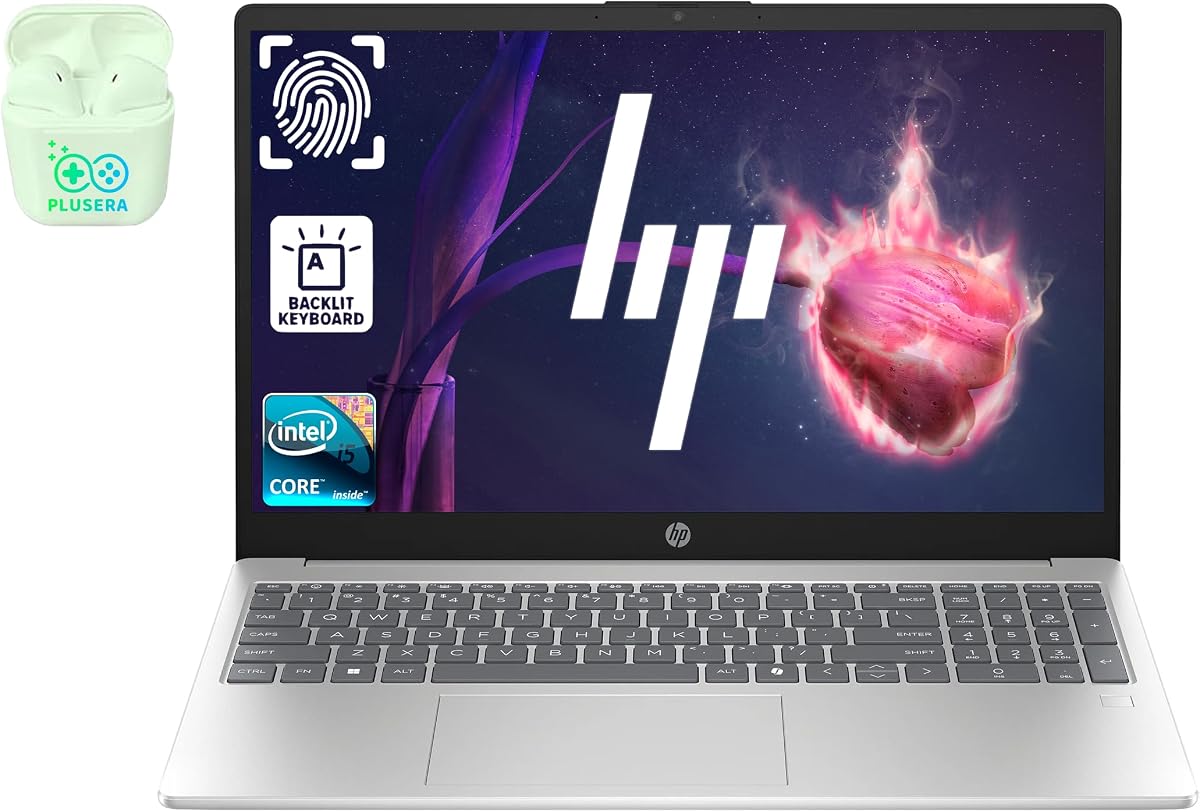

This HP laptop stands out as a practical choice for users needing a dedicated numeric keypad for spreadsheet work. It offers a balanced mix of memory and storage that supports multitasking without slowing down everyday applications.
We may earn a commission when you buy through this link, at no additional cost to you.
The 16GB of RAM ensures that you can keep multiple browser tabs and document windows open simultaneously. The inclusion of a full-size keyboard with a numeric keypad makes data entry significantly faster and more comfortable than on compact models.
While the processor is designed for essential computing tasks rather than heavy processing, it handles web browsing and video calls smoothly. The battery life supports a full workday away from an outlet, which adds convenience for mobile workers.
Ideal for students and home office users, this machine delivers reliable performance at an accessible price point. It is a solid recommendation for anyone prioritizing keyboard layout and memory capacity over high-end graphics capabilities.
The dedicated numeric keypad allows for quick number input which is essential for accounting and financial tracking tasks.
With 16GB of RAM you can switch between applications effortlessly without experiencing lag or slowdowns during daily use.
We may earn a commission when you buy through this link, at no additional cost to you.
This business laptop features a spacious 17.3-inch display that provides ample room for side-by-side document viewing. The combination of a powerful processor and dedicated numeric keypad makes it ideal for demanding office workflows.
We may earn a commission when you buy through this link, at no additional cost to you.
The Intel Core 5 10-Core processor ensures smooth performance when running complex spreadsheets or handling multiple browser tabs. You benefit from fast file access with the SSD which reduces wait times when opening large datasets.
Although the larger screen adds weight to the device the enhanced productivity benefits often outweigh the portability trade-off for fixed workstations. The Wi-Fi 6 support ensures stable and fast internet connections during online meetings.
Professionals who need a large workspace and efficient number entry will find this laptop well-suited for their needs. It offers a premium feel with robust specs that support long-term use in a business environment.
The 17.3-inch display lets you view multiple windows simultaneously which streamlines complex multitasking and comparison tasks.
Wi-Fi 6 ensures you maintain high-speed internet connections even in crowded wireless environments for reliable remote work.
We may earn a commission when you buy through this link, at no additional cost to you.
This budget-friendly option delivers essential features for students and home users who need a numeric keypad without breaking the bank. It includes a year of Microsoft 365 which adds immediate value for document creation and management.
We may earn a commission when you buy through this link, at no additional cost to you.
The Intel Quad-Core N200 processor handles basic tasks like web browsing and word processing efficiently. While storage is limited the SSD ensures the system boots quickly and responds promptly to user inputs.
The inclusion of Wi-Fi 6 is a nice touch for this price range ensuring you can connect to modern networks with better stability. The numeric keypad is functional and useful for entering data into forms or spreadsheets.
If you need a simple laptop for everyday computing and number entry this model provides excellent value. It is best suited for users who do not require extensive storage or high-end graphics performance.
One year of Microsoft 365 provides access to Word Excel and other essential tools right out of the box.
By focusing on essential specs this laptop keeps costs low while still delivering the numeric keypad functionality you need.
We may earn a commission when you buy through this link, at no additional cost to you.
This business laptop combines strong AMD performance with the necessary tools for efficient data entry. The Ryzen 7 processor ensures that even demanding applications run smoothly without lag.
We may earn a commission when you buy through this link, at no additional cost to you.
Windows 11 Pro offers enhanced security and management features that are beneficial for business environments. The 512GB SSD provides ample space for documents and applications while maintaining fast load times.
The numeric keypad is integrated into a full-size keyboard which improves typing accuracy for number-heavy tasks. Connectivity options like HDMI and Wi-Fi 6 make it easy to integrate into office setups.
Users seeking a balance of performance and practicality will appreciate this model. It is well-suited for professionals who need more than basic processing power for their daily work.
Windows 11 Pro includes tools like BitLocker and Remote Desktop that enhance security and management for business users.
The 8-core Ryzen 7 processor handles multitasking and data analysis tasks with ease for improved productivity.
We may earn a commission when you buy through this link, at no additional cost to you.
The HP Pavilion offers a crisp Full HD display that makes reading spreadsheets and documents easier on the eyes. Its slim design and numeric keypad make it a great choice for students on the go.
We may earn a commission when you buy through this link, at no additional cost to you.
The Intel N100 processor provides reliable performance for web browsing and office applications. Boot times are quick thanks to the SSD which helps you get to work faster in the morning.
Connectivity options include USB-C and HDMI allowing you to connect external monitors for an expanded workspace. The numeric keypad ensures you can input data efficiently without needing an external device.
This laptop is perfect for users who prioritize display quality and portability. It delivers a balanced experience for everyday tasks without unnecessary bloat or complexity.
The 1920×1080 anti-glare screen reduces eye strain during long sessions of data entry and document editing.
Weighing just under 4 pounds this laptop is easy to carry to classes or meetings without adding bulk.
We may earn a commission when you buy through this link, at no additional cost to you.
This model stands out with a high user rating and a strong set of business-focused features. The large amount of RAM ensures that productivity applications run smoothly throughout the day.
We may earn a commission when you buy through this link, at no additional cost to you.
The numeric keypad is well-positioned for comfortable data entry which is crucial for accounting and inventory tasks. Windows 11 Pro adds value with enhanced security features for protecting sensitive business data.
Connectivity includes Wi-Fi 6 and multiple USB ports allowing you to connect various peripherals without adapters. The design is thin and light which helps if you need to move around frequently.
Business users will find this laptop offers a reliable and efficient platform for daily operations. It combines essential productivity tools with a design that supports modern hybrid work styles.
16GB of RAM allows you to run multiple heavy applications simultaneously without performance bottlenecks or slowdowns.
Windows 11 Pro includes advanced security tools that help keep your business data safe from threats and unauthorized access.
We may earn a commission when you buy through this link, at no additional cost to you.
This Lenovo laptop includes an RJ45 Ethernet port which is rare on modern laptops and ensures a stable wired connection. It also features a numeric keypad and strong processing power for reliable business performance.
We may earn a commission when you buy through this link, at no additional cost to you.
The Intel Core i5-13420H processor handles demanding tasks well which is beneficial for running large spreadsheets or data analysis tools. The Windows 11 Pro system provides additional management options for IT departments.
With 16GB of RAM you can keep your work environment fluid without worrying about memory limits. The numeric keypad adds to the utility of the keyboard for frequent number entry tasks.
Users who value network stability and performance will appreciate this configuration. It is a solid choice for office environments where wired connections are preferred for security and speed.
The built-in Ethernet port guarantees a stable internet connection for critical tasks where Wi-Fi might be unreliable.
The high-performance i5 processor delivers fast execution times for applications requiring significant CPU resources.
We may earn a commission when you buy through this link, at no additional cost to you.
The Dell Inspiron adds a touchscreen to the mix allowing you to interact with content directly for enhanced engagement. The numeric keypad ensures you can still use traditional keyboard shortcuts for precise data entry.
We may earn a commission when you buy through this link, at no additional cost to you.
A 10-core Intel processor provides plenty of power for general business tasks and media consumption. The AI Copilot integration offers helpful features for organizing tasks and generating content quickly.
Touchscreen capabilities are great for presentations or quick selections but may not appeal to everyone. The numeric keypad complements the touch interface by offering precision input for numbers and letters.
This model is a versatile option for users who want interaction variety alongside traditional input. It balances modern features with practical tools for a well-rounded computing experience.
Touchscreen functionality allows for intuitive navigation and annotation which enhances collaborative work and media viewing.
Built-in AI Copilot helps you organize information and streamline workflows with intelligent suggestions and automations.
We may earn a commission when you buy through this link, at no additional cost to you.
This renewed laptop offers robust security features including a fingerprint reader for quick and safe access to your device. The numeric keypad and backlit keyboard enhance usability in various lighting conditions.
We may earn a commission when you buy through this link, at no additional cost to you.
The Intel Core i5 processor ensures responsive performance for common office tasks and web applications. Having a numeric keypad integrated into the design simplifies data entry for financial or inventory work.
The backlit keyboard allows you to work comfortably in low-light environments without straining your eyes. The numeric keypad is placed ergonomically to reduce hand movement during number entry sessions.
For users looking for value with extra security this model is a strong contender. It provides a blend of modern features that support productivity and protection for everyday work.
The fingerprint reader allows for secure and quick login which protects your data without requiring complex passwords.
A backlit keyboard enables you to type accurately in dimly lit rooms without needing an external light source.
We may earn a commission when you buy through this link, at no additional cost to you.
This HP laptop features a large 17.3-inch display which provides a desktop-like experience for multitasking and number entry. The numeric keypad is comfortably positioned for quick data input across long sessions.
We may earn a commission when you buy through this link, at no additional cost to you.
The AMD Ryzen 5 CPU delivers solid performance for business applications and media streaming. A generous amount of RAM ensures that multiple applications can run simultaneously without slowing down your workflow.
Battery life is designed to last through a full workday which adds flexibility for your daily schedule. The large screen makes it easier to view detailed spreadsheets or compare documents side by side.
Ideal for users who prioritize screen real estate and processing power this laptop is a powerful workstation. It combines essential productivity tools with a design that supports demanding work habits.
The 17.3-inch screen offers significantly more viewing area than smaller laptops allowing for better multitasking.
Extended battery life means you can work uninterrupted throughout the day without constantly searching for power outlets.
We may earn a commission when you buy through this link, at no additional cost to you.
Selecting the right laptop with a numeric keypad requires evaluating several key factors that impact daily productivity and comfort.
Screen size dictates how much information you can view at once. Larger screens like 17.3 inches offer more space for side-by-side spreadsheets whereas 15.6 inches balances portability and workspace.
Always opt for at least Full HD resolution to ensure text is crisp and easy to read during long data entry sessions.
Your processor determines how smoothly the laptop handles multiple tasks. Intel Core or AMD Ryzen chips with multiple cores provide the power needed for complex calculations and multitasking.
For basic number entry an entry-level processor may suffice but professionals should choose a mid-range chip for longevity.
RAM controls how many applications can run simultaneously without slowing down. 8GB is a minimum for general use but 16GB ensures smoother multitasking with many browser tabs and programs.
Investing in higher RAM helps future-proof your device against growing software demands over time.
Solid State Drives offer faster boot times and file access compared to traditional hard drives. Aim for at least 256GB SSD storage to ensure your system runs efficiently without running out of space quickly.
Larger storage capacities are beneficial if you store many local files or install numerous applications regularly.
A dedicated numeric keypad is essential for efficient data entry. Ensure the keyboard is full-size and has a comfortable feel to avoid finger fatigue during long typing sessions.
Check if the keys have backlighting for working in low-light environments which enhances usability significantly.
Modern laptops should include Wi-Fi 6 for faster wireless speeds and Bluetooth for peripherals. Ports like HDMI and USB-C allow you to connect external monitors and drives for expanded workflows.
Consider models with Ethernet ports if you need a stable wired connection for critical business applications.
Battery life determines how long you can work unplugged. A minimum of 8 to 10 hours is ideal for users who work from cafes or offices without immediate access to power outlets.
Look for fast charging support to quickly top up the battery during short breaks in your day.
Windows 11 offers modern features like AI Copilot and enhanced security. Pro versions provide extra management tools useful for business environments requiring specific compliance or remote access capabilities.
Ensure the operating system supports the software you need for your specific industry or academic tasks.
Proper handling of your numeric keypad ensures long-term functionality and accuracy. Avoid pressing the keys with excessive force and clean the keyboard regularly with a soft cloth to prevent dust buildup.
Use the included numeric keys frequently to maintain familiarity and speed. Regular practice helps you reduce errors and improve your overall efficiency when entering data into spreadsheets or forms.
Keep the laptop on a stable surface to prevent accidental pressure on the keys. Using a laptop stand or cooling pad can also help maintain optimal temperatures during extended use sessions.
A numeric keypad significantly speeds up data entry tasks such as accounting or inventory management. It allows users to input numbers quickly without switching between keyboard sections reducing fatigue and errors.
Not all 15-inch laptops include a dedicated numeric keypad. Some models opt for a compact layout to save space so you must check the specific keyboard configuration before purchasing.
Yes 8GB RAM is generally sufficient for basic office tasks and data entry. However upgrading to 16GB improves multitasking performance if you run many applications simultaneously.
You can use a USB or Bluetooth numeric keypad on almost any laptop with available ports. This is a flexible option for laptops with smaller keyboards that lack a built-in numeric section.
Windows 11 Pro includes enhanced security features like BitLocker and remote access tools. These capabilities help businesses protect sensitive data and manage devices more effectively.
Use compressed air to remove dust from the keys and a slightly damp microfiber cloth for surface cleaning. Avoid spraying liquids directly onto the keyboard to prevent moisture damage.
We reviewed ten top-rated laptops that feature dedicated numeric keypads to help streamline your daily workflows. Each model offers unique strengths from budget-friendly options to high-performance business machines.
Prioritize features like RAM capacity and screen size based on your specific workload requirements. A well-matched laptop ensures that your data entry tasks are efficient and comfortable over time.
Prices and availability change frequently so always verify the latest details before purchasing. Taking a moment to compare current offers ensures you get the best value for your investment today.