
Kayoubi 14.5 Inch
4.5Editor score
Large jumbo drawing space
Zero glare eye-friendly display
One-click erase and lock
This guide compares the top LCD Writing Tablet for Kids Doodle Board models to help parents find the best portable drawing toy for creativity and learning.
Finding the perfect digital drawing tool for young children can be challenging for modern parents. These tablets offer a mess-free way to express creativity while protecting eyes from harmful blue light. They are ideal for travel and everyday play.
We compared ten top-rated models based on screen size, battery life, durability, and ease of use. Each product was analyzed for its educational value and ability to keep kids engaged for hours without screens or ink.
Each pick highlights unique features like lock buttons, reusable batteries, and anti-lost styluses. Prices and availability change frequently, so verify the latest details before purchasing to ensure you get the best value for your family.
4.5Editor score
4.5Editor score

4.5Editor score
This side-by-side comparison helps you quickly identify the right model for your child's needs based on screen size, power source, and key features.


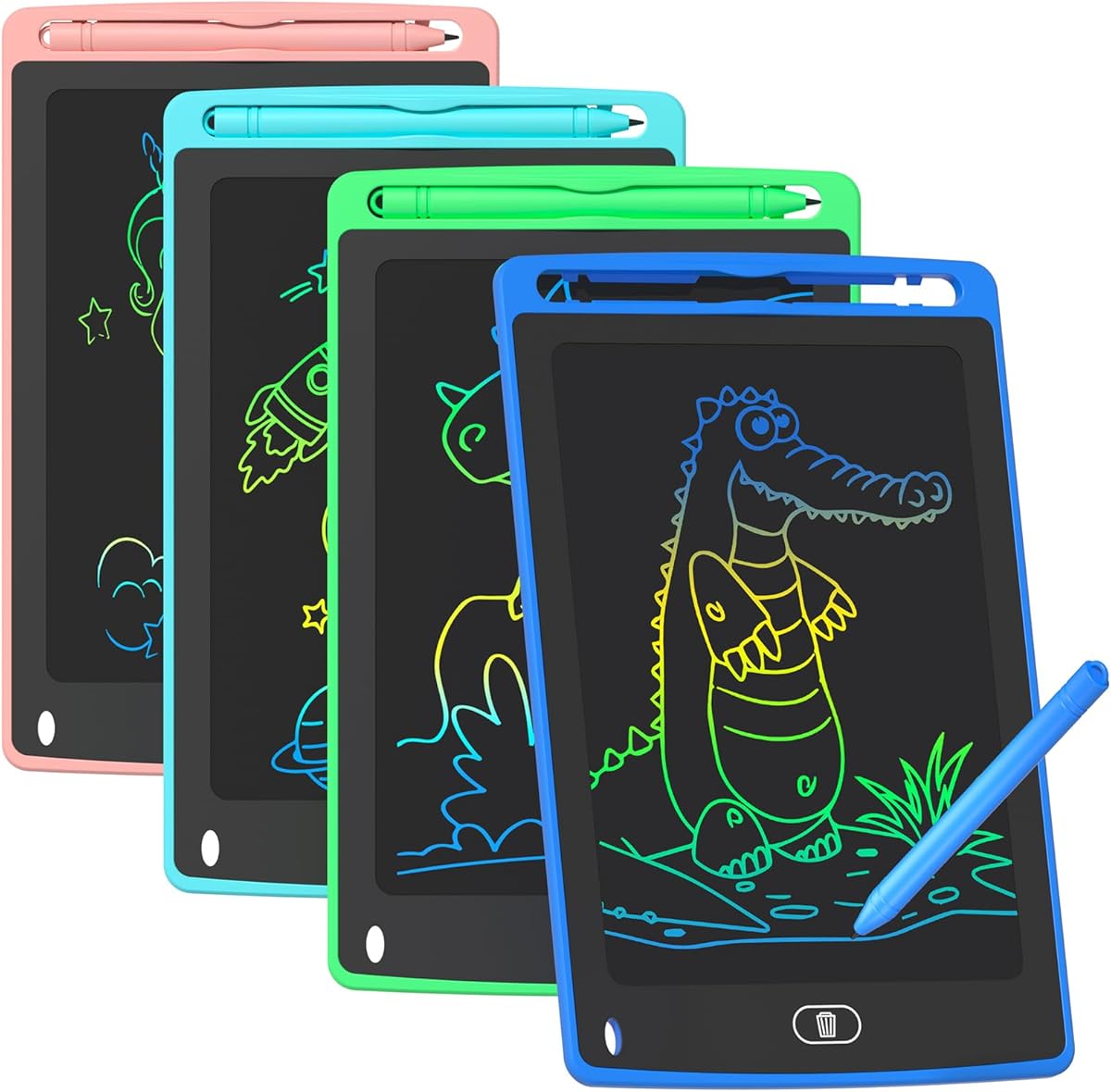
This 4-pack set stands out as an excellent value proposition for families with more than one child. With a rating of 4.5 stars, it offers flexible liquid crystal technology that is brighter and clearer than many competitors on the market.
We may earn a commission when you buy through this link, at no additional cost to you.
The pressure-sensitive technology allows kids to draw lines of different thicknesses based on how hard they press, mimicking the feel of real pens. Each tablet in the pack comes in a different color, which helps children identify their own work easily.
While the screen is smaller than some 16-inch models, the compact size makes it highly portable for car rides or restaurant visits. The pen fits snugly on top of the tablet so it is less likely to get lost during play.
Parents looking for an affordable gift that encourages creativity without the mess of paper or crayons should consider this set. It is ideal for siblings to share or for a child to keep multiple boards in different rooms.
The four-pack design allows multiple children to draw simultaneously without fighting over a single device.
Pressing the button on the front clears the screen instantly so kids can start fresh drawings immediately.
We may earn a commission when you buy through this link, at no additional cost to you.
Kayoubi offers a massive 14.5-inch screen that provides plenty of room for young artists to sketch and write freely. This model focuses on simplicity and eye safety, making it a top choice for parents worried about blue light exposure.
We may earn a commission when you buy through this link, at no additional cost to you.
The display features zero harsh blue light or glare, which is crucial for protecting little eyes during extended play sessions. It acts as a paperless alternative to traditional drawing tools, reducing waste and cleanup time significantly.
A single button erase and lock function ensures that masterpieces are not accidentally deleted while kids are still working on them. The pink design is appealing to many children, though it might not suit every color preference.
For families seeking a large canvas without a high price tag, this tablet delivers excellent value. It is perfect for home use, classrooms, or long car trips where a bigger drawing area is preferred over portability.
The non-self-illuminating screen mimics paper vision, reducing eye strain during hours of creative play.
Forget paper stacks and ink stains with this reusable pad that wipes clean with a single button press.
We may earn a commission when you buy through this link, at no additional cost to you.
This 16-inch model stands out for its USB rechargeable battery, which lasts up to six to nine months on a full charge. This feature reduces the need for disposable batteries, making it more environmentally friendly and cost-effective over time.
We may earn a commission when you buy through this link, at no additional cost to you.
The screen utilizes the newest LCD technology, delivering colors that are sixty percent brighter than other tablets on the market. This brightness ensures that drawings are vivid and easy to see even in varied lighting conditions.
Safety is prioritized with a hidden battery compartment and an impact-resistant ABS shell that can withstand drops and falls. The included stylus has a stretch rope binding to prevent it from getting lost during travel or play.
Families who want a high-quality, durable device that grows with their child will appreciate this premium option. The large screen and long battery life make it ideal for both home use and extended travel adventures.
The built-in lithium polymer battery reduces waste by eliminating the need for frequent disposable battery replacements.
The hidden battery and tough ABS shell protect children from accidental swallowing and resist everyday rough handling.
We may earn a commission when you buy through this link, at no additional cost to you.
KOKODI focuses on providing a larger drawing tablet to help children focus on their creativity without the constraint of a small board. The 16-inch screen offers ample space for graffiti and easy viewing of intricate drawings.
We may earn a commission when you buy through this link, at no additional cost to you.
This model features a replaceable battery design that can be used for three to six months, offering flexibility without requiring complex charging setups. The screen protects eyes from radiation and glare, ensuring safe long-term use.
The one-click clear and lock feature prevents accidental deletions, which is a common pain point for kids who are in the middle of creative bursts. The durable design ensures it can handle regular use by toddlers and older children alike.
For parents who value screen real estate and simplicity, this tablet is a strong contender. It serves well as a learning tool for preschoolers and a draft pad for teens, making it a versatile gift for various ages.
The larger screen ensures that children are not bothered by small drawing limits, allowing more imaginative play.
The eye protection technology ensures no radiation or glare, making it comfortable for kids to use daily.
We may earn a commission when you buy through this link, at no additional cost to you.
This tablet includes two styluses, making it easy for parents and kids to share creativity and learning time together. The 16-inch screen offers tons of space to unleash imagination, ensuring that every idea can be captured clearly.
We may earn a commission when you buy through this link, at no additional cost to you.
With a built-in rechargeable battery that delivers up to nine months of playtime on a single charge, this device is designed to last. The solid child-safe ABS body keeps the battery securely sealed inside, giving parents peace of mind.
The zero mess feature means parents no longer need to worry about stained walls or ruined clothes from traditional drawing tools. It is feather-light and slips into any bag, making it perfect for keeping little hands busy on road trips.
If you want a tool that encourages bonding between parent and child, this shared setup is ideal. It covers all bases from homework drafting to pure fun, making it a versatile gift for birthdays and holidays.
Two included styluses mean you can draw together, turning playtime into an interactive learning experience.
Say goodbye to cleanup headaches as this tablet allows free creation without any stains or physical mess.
We may earn a commission when you buy through this link, at no additional cost to you.
BUKEBU offers a premium feel with its lightweight 200g design that is easy for young children to handle anywhere. The screen uses eye protection material that is completely safe, featuring no glare or radiation for extended use.
We may earn a commission when you buy through this link, at no additional cost to you.
With a lock button on the side, this model prevents accidental touch deletions while still allowing erasing when unlocked. It can be used up to 100,000 times, providing a reusable alternative that saves paper and money over time.
The rounded corner design and ABS material shell provide excellent shock and drop resistance. This makes it a durable option for active toddlers who might drop their toys while playing in the car or at school.
For parents looking for a portable toy that is kind to young eyes, this tablet is a great choice. The customer service policy of 18 months replacement adds value, ensuring you are covered if any issues arise.
Weighing only 200 grams, it is easy for children to carry without fatigue, even during long trips.
The side lock button ensures that artwork is not deleted accidentally, preserving creative masterpieces for longer.
We may earn a commission when you buy through this link, at no additional cost to you.
FLUESTON provides a highly sensitive pressure sensitive technology that feels like writing on paper with a pen or pencil. This tactile feedback is excellent for children who need sensory toys, including those with autism or sensitive needs.
We may earn a commission when you buy through this link, at no additional cost to you.
The ultra-thin design at 0.26 inches and weight of six ounces makes it incredibly easy to carry in school bags or purses. It serves multiple roles from a drawing pad to a message board for family communication.
With a CR2025 button battery that lasts up to 12 months, you do not need to worry about frequent power changes. The screen is safe and hygienic, shielded from radiation and glare to protect your child's eyes.
This tablet is perfect for parents who need a reliable tool for school or quiet times at home. It is a safe, clean, and engaging option that encourages writing practice and creativity without the mess of traditional tools.
The pressure sensitive tech mimics the tactile experience of paper, helping kids develop fine motor skills.
Use it as a doodle board or a family message board to keep communication fun and interactive for kids.
We may earn a commission when you buy through this link, at no additional cost to you.
This model boasts a massive 20-inch screen, offering the largest canvas in this roundup for kids who love to create big artwork. It is designed to help toddlers and young children unleash their imagination without physical constraints.
We may earn a commission when you buy through this link, at no additional cost to you.
The electronic design allows for endless erasing and redrawing, making it a versatile learning tool for preschoolers. The blue color is fun and appealing to many children, encouraging them to engage with the device regularly.
While the large screen provides exceptional space, it may be less portable than smaller models. However, for home use or stationary play, it offers an unmatched experience for creative expression and storytelling.
Parents looking for a dedicated play station for their child should consider this ultra-large option. It transforms drawing into an expansive activity that can help develop spatial awareness and artistic confidence.
The 20-inch screen gives kids room to draw large scenes that smaller tablets simply cannot accommodate.
Designed for ages 3 to 6, this tool helps toddlers explore shapes and colors through interactive drawing.
We may earn a commission when you buy through this link, at no additional cost to you.
ORSEN delivers a simple and reliable solution with its 10-inch color screen that protects eyes from radiation and glare. It is a lightweight device at 150g, making it easy for small hands to carry and use independently.
We may earn a commission when you buy through this link, at no additional cost to you.
The stylus can be hung on the writing board through a lanyard, ensuring that it does not get lost during play. This small detail adds significant value for parents who often lose small accessories.
The anti-shock and anti-fall case ensures that the tablet can withstand drops and rough handling by active children. With a built-in battery that lasts up to six months, it is a low-maintenance option for daily use.
For families seeking a straightforward toy that works out of the box, this model is an excellent choice. It balances affordability with essential features like lock buttons and durable materials that kids need.
The included lanyard keeps the stylus attached to the tablet so it never gets lost during play or travel.
At 150g, it is easy for kids to handle, while the shock-resistant case protects it from everyday bumps.
We may earn a commission when you buy through this link, at no additional cost to you.
This 12-inch tablet is specifically designed for travel with a lanyard that ensures the stylus is never lost anywhere. The waterproof, anti-drop, and anti-shock body makes it a rugged choice for road trips and outdoor adventures.
We may earn a commission when you buy through this link, at no additional cost to you.
It serves multiple roles from a doodle board to an office memo board for adults, making it a versatile tool for the whole family. The 240g weight is light enough to fit easily into school bags or handbags without adding bulk.
The locking mechanism prevents accidental deletions, which is critical when using it on a moving vehicle. Its durability ensures it can handle the bumps of daily school use or travel without significant wear or tear.
For parents who need a reliable gadget for on-the-go entertainment, this model is a top contender. It combines practical features like lanyards and durability with a useful size that fits both kids and adults.
The attached lanyard ensures the stylus stays with the tablet, solving the common problem of lost accessories.
Waterproof and anti-shock materials mean this tablet can survive the drops and bumps of active travel.
We may earn a commission when you buy through this link, at no additional cost to you.
Selecting the right drawing tablet requires considering factors like screen size, battery type, and durability features to match your child's age and lifestyle needs.
Screen size ranges from 8.5 inches to 20 inches. Larger screens offer more room for complex drawings but are bulkier for travel. Smaller screens are easier to carry but may limit creative expression.
Choose a size that fits your child's drawing habits and how often they move the device.
Some tablets use replaceable button batteries while others have built-in rechargeable lithium batteries. Rechargeable models reduce waste and save money over time but require charging cables. Button batteries are simpler to replace.
Consider how long you want between power changes and whether your child needs a rechargeable option for long trips.
Look for ABS shells with drop resistance and anti-shock corners. Children often drop toys, so a rugged build ensures longevity. Some models also include lanyards to prevent stylus loss.
Prioritize models with protective designs if you plan to use the tablet in cars or schools.
All LCD writing tablets offer eye safety benefits by eliminating blue light and radiation. This feature protects children's eyesight during extended play sessions compared to tablets or phones.
Ensure the screen is non-self-illuminating to provide the best vision protection for your child.
Simple interfaces with one-click erase and lock buttons are crucial for young children. The ability to save a drawing prevents frustration from accidental erasures. Check if the buttons are easy to reach.
Select a model with clear tactile buttons so kids can operate it independently without confusion.
Lightweight models under 250 grams are easier for kids to carry in bags. This is important for school use or travel where space is limited. Heavier models might be less suitable for small hands.
If you need a travel companion, prioritize light weight and compact dimensions for ease of transport.
These tablets support writing, spelling, math, and drawing skills. Look for features that encourage learning alongside fun such as color variety or line sensitivity. This turns play into productive learning time.
Choose a model that aligns with your child's learning goals to maximize the educational benefits.
Check the warranty policy and customer service options. Some brands offer 18-month replacements which adds value if the device fails early. Good support ensures peace of mind for your purchase.
Verify that the seller offers clear support channels in case you encounter issues with the device.
To start using the tablet, ensure the battery is correctly installed or the device is charged. Use the included stylus to draw on the screen; pressure changes will alter line thickness for creative effects.
Keep the stylus secured with the lanyard if provided to prevent loss. For younger children, help them understand how to use the lock button to save their drawings before clearing the screen.
Clean the screen gently with a soft cloth to remove dust or smudges. Store the tablet in a cool, dry place when not in use to maintain battery life and screen quality over time.
No, these LCD writing tablets do not emit blue light. They use passive LCD technology that does not self-illuminating, making them safer for eyes than traditional screens.
Battery life varies by model. Button batteries can last up to 12 months, while rechargeable options offer 6 to 9 months of usage on a full charge depending on daily use.
Yes, they are designed to be safe. Many models have hidden batteries to prevent swallowing and durable shells to withstand drops, making them safe for children aged 3 and up.
Yes, most tablets have a lock button. Pressing this locks the screen to preserve the drawing. You must unlock it again to clear the screen or draw over the existing art.
Most models include a stylus with the package. Some premium options even include two styluses for sharing between parent and child or for multiple users.
Absolutely. They are excellent for writing letters, numbers, and math practice. The paper-like writing feel helps children develop handwriting skills without wasting paper.
This guide highlighted the top 10 LCD writing tablets offering features like rechargeable batteries, large screens, and durable designs. The 4-pack set is great for families, while the Kayoubi 14.5 Inch offers excellent value for large screens.
Prioritize screen size and battery type based on how your child uses the device daily. Look for models with lock buttons and sturdy build quality to ensure longevity and usability.
Prices and availability fluctuate so verify the current deal before purchasing. These tools provide a clean way for kids to express creativity and learn without the mess of traditional art supplies.