
TP-Link ER605
4.4Editor score
Five Gigabit Ports
Advanced Security Features
Highly Secure VPN Support
This guide compares the top 10 load balancing routers for businesses and power users, evaluating multi-WAN support, security features, and throughput performanc
Finding the right network hardware is crucial for maintaining reliable connectivity in modern environments. A load balancing router ensures that traffic is distributed efficiently across multiple internet connections, preventing bottlenecks and minimizing downtime for critical operations.
We evaluated ten top-rated models based on their WAN port flexibility, security capabilities, and ease of management. Our analysis focuses on how each device handles concurrent connections, failover scenarios, and advanced routing protocols to help you make an informed decision.
Each pick below highlights specific strengths such as budget-friendly pricing, enterprise-grade security, or high-speed throughput. Please note that availability and specific configurations may change over time, so verify current specs before purchasing to ensure compatibility with your network.
4.4Editor score

4.7Editor score

4.0Editor score
This side-by-side comparison highlights the key specifications and capabilities of each selected model to help you quickly identify the device that best fits your specific network requirements and performance needs.



The Omada Fusion 2.5G stands out as a top contender for modern network needs with its high-speed ports and intuitive management tools. It boasts a strong rating of 4.7 stars, reflecting user satisfaction with its performance and ease of use in various business environments.
We may earn a commission when you buy through this link, at no additional cost to you.
Its five 2.5G ports deliver outstanding speed, making it ideal for bandwidth-heavy applications. The built-in touchscreen allows for instant on-site insights like health scores and traffic stats without needing a laptop, which significantly speeds up troubleshooting efforts.
While it offers excellent value for the performance, the reliance on the Omada ecosystem means you may need to consider other compatible devices for full functionality. Additionally, the price is higher than some budget options, but the advanced features justify the investment for serious users.
This router is perfect for medium-sized businesses or tech-savvy users who need reliable connectivity and quick access to network diagnostics. If you want a device that balances high throughput with user-friendly management, this is a top recommendation for 2026.
The touchscreen interface provides immediate access to system health and traffic data, reducing the need for external tools during maintenance.
Remote management through the Omada Cloud portal allows administrators to monitor multiple sites from a single interface without licensing fees.
We may earn a commission when you buy through this link, at no additional cost to you.
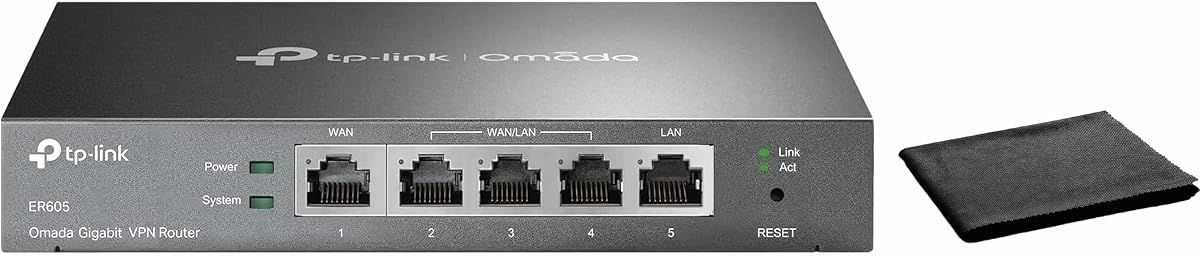
For those seeking reliability without breaking the bank, the TP-Link ER605 offers a compelling solution with its robust feature set. With a rating of 4.4 stars, it is widely recognized for its stability and ability to handle multiple internet connections efficiently.
We may earn a commission when you buy through this link, at no additional cost to you.
This device features five gigabit ports and supports USB WAN connectivity for backup via 4G modems. Its security suite includes SPI firewall and DoS defense, ensuring your data remains protected while you balance traffic across different networks seamlessly.
While it lacks some of the advanced customization found in enterprise models, its ease of use makes it a favorite for small offices. The compact design fits easily in tight spaces, though the web interface may feel basic compared to cloud-managed alternatives.
Ideal for small businesses or home labs needing basic load balancing, this router delivers excellent value. If you prioritize straightforward functionality and budget-friendly pricing over cutting-edge features, this model is a safe and effective choice.
With five gigabit ports and USB WAN support, users can easily connect multiple ISPs or mobile backups for improved redundancy.
Built-in SPI firewall and DoS defense help protect your network perimeter without requiring complex configuration or additional software.
We may earn a commission when you buy through this link, at no additional cost to you.
The Alta Labs Route10 is built for users who demand maximum speed and control over their wired network infrastructure. It earns a 4.0 rating for its high-performance capabilities, delivering consistent multi-gigabit performance without bottlenecks in demanding environments.
We may earn a commission when you buy through this link, at no additional cost to you.
Featuring two 10 Gbps SFP+ ports and four 2.5 Gbps ports, this router handles heavy traffic loads effortlessly. The integrated PoE+ output allows you to power access points directly, simplifying your setup by removing the need for separate power injectors.
It does not broadcast Wi-Fi, requiring you to pair it with access points for wireless coverage. While this adds to the cost of a full network, it ensures that routing tasks are handled by dedicated hardware for maximum efficiency and stability.
Best suited for advanced home users or enterprises needing top-tier throughput, this device excels where speed and reliability are paramount. If you are looking for a powerhouse router that supports advanced traffic monitoring and high-speed connections, this is a premium option.
The inclusion of 10Gbps and 2.5Gbps ports ensures your network keeps pace with high-bandwidth demands from cloud services and large files.
Integrated PoE+ ports reduce cable clutter and power costs by allowing devices like cameras and access points to draw power directly from the router.
We may earn a commission when you buy through this link, at no additional cost to you.
The TP-Link ER7206 is designed for professional environments that need to manage a large number of devices efficiently. With a 4.5 rating, it stands out for its capacity to support up to 700 clients and integrate smoothly with Omada's Software Defined Networking platform.
We may earn a commission when you buy through this link, at no additional cost to you.
It offers flexible port configuration with up to four WAN ports, allowing extensive bandwidth optimization through a single device. Security features like advanced firewall policies and DoS defense ensure your network remains secure even under heavy usage or attempted attacks.
While it offers great scalability, utilizing its full SDN features requires a compatible controller which may add to the initial setup complexity. However, the ability to access settings remotely via cloud options makes managing multiple sites much easier for administrators.
This router is ideal for growing businesses or campuses needing centralized control and high capacity. If you need to support hundreds of devices while maintaining strong security and remote management capabilities, this model provides a solid professional foundation.
With support for up to 700 clients, this router prevents connection drops even in busy office or event environments.
The Omada app and cloud access allow you to manage your network from anywhere, ensuring consistent performance across different locations.
We may earn a commission when you buy through this link, at no additional cost to you.
The Cudy R700 appeals to users who want deep control over their network without the cost of enterprise gear. It holds a 4.4 rating for its ability to support OpenWRT, unlocking advanced firewall rules and custom QoS policies for professional-grade management.
We may earn a commission when you buy through this link, at no additional cost to you.
With five gigabit ports, it handles automatic failover and load balancing seamlessly to keep your internet running even if one connection drops. Built-in diagnostic tools like Ping and Traceroute help troubleshoot issues quickly without needing external equipment.
While OpenWRT offers powerful customization, it may require a steeper learning curve for less technical users. Additionally, relying on community-developed packages means you need to verify compatibility yourself before installing custom features on your device.
This router is best for IT enthusiasts or small offices needing specific network segmentation and high flexibility. If you value control over your routing software and want to optimize traffic with custom policies, this device offers significant value.
Full OpenWRT support allows you to modify network rules and install custom packages that standard routers typically restrict.
Integrated tools like Ping, Traceroute, and system logs simplify troubleshooting by giving you immediate access to network performance data.
We may earn a commission when you buy through this link, at no additional cost to you.
The Omada ER7412-M2 brings enterprise-grade security and speed to businesses needing extensive network segmentation. With a 4.5 rating, it is well-regarded for its ability to handle up to 11 WAN ports for maximum broadband utilization and high-security VPN connections.
We may earn a commission when you buy through this link, at no additional cost to you.
It features two 2.5G ports alongside ten gigabit options, providing ample capacity for diverse traffic types. Security is a priority with IPS/IDS and DPI features that scan traffic for threats, ensuring your data remains safe from sophisticated attacks.
Its advanced features may be more than what a simple home network needs, and the larger size requires a dedicated space in your rack or cabinet. However, for organizations where security and bandwidth are critical, these capabilities are essential for operational continuity.
If you manage a business network requiring strict security protocols and high-speed ports, this router is an excellent investment. Its ability to prioritize traffic and secure connections makes it ideal for environments where performance and protection are equally important.
Deep Packet Inspection and IPS/IDS scan incoming and outgoing traffic for threats, providing a robust layer of defense for your network.
With both 2.5G and Gigabit ports, you can connect high-speed servers while keeping standard devices on dedicated high-performance links.
We may earn a commission when you buy through this link, at no additional cost to you.
For very small offices where speed requirements are moderate, the TP-Link TL-R470T+ provides reliable load balancing without unnecessary complexity. It has a 4.2 rating, making it a solid choice for internet cafes or small businesses needing backup connections.
We may earn a commission when you buy through this link, at no additional cost to you.
Its four 10/100M WAN ports allow for maximum bandwidth usage through load balancing, ensuring consistent internet access even if one line fails. Features like IP and MAC binding help prevent ARP virus attacks and secure your local network effectively.
The downside is that it operates at 100M speeds which may be insufficient for modern high-speed fiber connections. However, for networks where basic reliability is the main goal, this model remains a cost-effective solution that delivers on its core promise.
If you need a simple way to manage multiple internet lines in a small environment, this router is a practical option. It offers the basic tools needed for client management and security without the high cost of gigabit routers.
The smaller case and lower price point make this an ideal entry point for businesses needing basic load balancing features.
Built-in IP and MAC binding helps ensure that only authorized devices can connect to your network, preventing unauthorized access.
We may earn a commission when you buy through this link, at no additional cost to you.
The TP-Link TL-R480T+ is a straightforward device designed for users who need basic load balancing without advanced settings. With a 4.2 rating, it offers a simple approach to managing multiple internet lines for improved reliability in small setups.
We may earn a commission when you buy through this link, at no additional cost to you.
It features five ports with three configurable WAN LAN ports to help you optimize bandwidth usage across different connections. The device is compact and easy to deploy in small offices or environments where simplicity is more valuable than high throughput.
While it handles basic load balancing well, it lacks modern features like gigabit speeds or advanced security suites found in newer models. This makes it suitable only for low-demand scenarios where basic connectivity is the primary requirement for the network.
If you need an inexpensive way to maintain uptime with multiple lines in a low-traffic environment, this router works well. It delivers on the promise of simple load balancing for users who do not need extensive configuration options.
Three configurable ports allow you to adapt the device to your specific network layout without needing additional hardware.
The small size ensures you can place the router in tight spaces, keeping your workspace tidy while maintaining network access.
We may earn a commission when you buy through this link, at no additional cost to you.
The TP-Link ER-605 simplifies network management with its intuitive web interface and Omada app compatibility. Holding a 4.3 rating, it provides reliable wired connections with dual WAN ports that enable seamless load balancing for small businesses.
We may earn a commission when you buy through this link, at no additional cost to you.
Its bandwidth management ensures optimal performance for critical applications by prioritizing traffic based on your needs. Security is handled by an SPI firewall and DoS defense which protect your data while maintaining fast and consistent internet access.
While it is limited to two WAN ports, this configuration is sufficient for most small setups needing basic redundancy. The compact design fits easily in any office, though the management features are somewhat basic compared to higher-end enterprise solutions.
If you are looking for an easy-to-deploy router that offers good reliability and basic security for a small office, this is a solid choice. It strikes a balance between simplicity and necessary features for maintaining network uptime.
The intuitive web interface and Omada app compatibility make initial configuration quick for users without extensive network experience.
Intelligent bandwidth management ensures your key applications get the priority they need to function smoothly without interruption.
We may earn a commission when you buy through this link, at no additional cost to you.
The Ubiquiti EdgeRouter 4 is known for its powerful platform that gives administrators full control over routing policies. With a 4.6 rating, it is a favorite among tech enthusiasts who value flexibility and performance in a reliable hardware package.
We may earn a commission when you buy through this link, at no additional cost to you.
It features three gigabit ports plus an SFP port for flexible connectivity options. The fanless design ensures quiet operation which is perfect for home labs or offices where noise levels are a concern during daily operation.
While highly capable, the interface can be complex for beginners requiring command-line knowledge for advanced configuration. However, the flexibility it offers allows for custom scripts and detailed traffic shaping that other routers simply cannot match effectively.
For users who want maximum control over their network traffic and are comfortable with Linux-based management, this device is ideal. It provides a professional-grade foundation for anyone building a customized network infrastructure for their home or business.
The fanless design ensures the device runs silently, making it suitable for quiet environments like home offices or living rooms.
Support for SFP ports and multiple mounting options lets you adapt the router to various physical locations and network needs.
We may earn a commission when you buy through this link, at no additional cost to you.
Selecting the right router requires understanding your specific network needs and budget. We break down the most important factors to help you choose a device that supports your connectivity goals effectively.
The number of WAN ports determines how many internet connections you can balance simultaneously. Look for routers that offer speeds matching your ISP plan, such as Gigabit or 2.5G ports, to avoid bottlenecks when traffic is distributed.
Ensure the device supports enough ports for your current connections and future expansion. Higher speeds ensure your backup links are as fast as your primary connections.
Automatic failover ensures your network stays online if one connection fails. This feature checks connection health and reroutes traffic instantly without user intervention, which is vital for businesses that cannot afford downtime.
Verify that the router allows you to configure health checks and recovery settings so it responds correctly to internet outages.
Built-in firewalls and DoS protection are essential for protecting your data. Strong encryption protocols like OpenVPN or WireGuard keep your remote access secure when you connect outside the office.
Choose a router with regular firmware updates to ensure vulnerabilities are patched over time and your network remains secure.
An intuitive web interface or mobile app makes setting up rules much easier. Cloud management allows you to check on your network remotely which is helpful if you manage multiple sites.
Consider how easy it is to monitor traffic and apply changes without needing technical support for routine maintenance tasks.
A faster processor ensures smooth traffic routing even with many devices connected. High throughput means data packets move through the router quickly without causing delays for applications like video calls.
Check for hardware-accelerated features to ensure the device can handle heavy loads without slowing down your overall network performance.
Besides WAN ports check the LAN ports available for connecting computers and servers. Having enough Gigabit or 2.5G ports avoids the need for extra switches in small setups.
Ensure you have the right mix of copper and fiber ports to match the cabling and devices you already have installed.
Routers vary significantly in price based on their features and performance limits. Determine which features are essential for your use case to avoid paying for capabilities you will never use or need.
A higher initial cost often pays off through better longevity and reliability which reduces replacement costs over time for your infrastructure.
Some routers work best with other devices from the same brand for seamless management. Consider if you plan to add more switches or access points later that might need to integrate with your router.
Compatibility with existing networking gear ensures your setup remains simple to manage as your business grows and requires more devices.
Start by connecting your modem cables to the designated WAN ports on the router. Ensure each connection corresponds to the specific ISP you intend to balance so the device can detect all available internet sources correctly.
Log in to the web interface using the default credentials and navigate to the load balancing settings. Set your preferred method for distribution such as round robin or ratio to match your speed and usage needs.
Regularly check for firmware updates through the admin panel to maintain security and performance. Keep the device in a well-ventilated area to prevent overheating which can affect long-term reliability and speed.
A load balancing router allows multiple internet connections to work together as one. This increases your total available bandwidth and ensures you stay online even if one link goes down.
They do not increase the speed of a single line but can combine multiple lines for more capacity. This is beneficial when you have several ISPs and need higher total bandwidth for many users.
Failover is when your router switches to a backup connection if the primary one fails. This ensures your network stays up without manual help during an outage.
Yes, many models work for home users with multiple lines like fiber and mobile. Look for simpler setups if you do not need advanced enterprise features or complex configurations.
Most include built-in firewalls and support for secure VPN connections. These protect your data when connecting from outside or sharing network resources with clients securely.
Basic setup is straightforward with the guided wizards available on most devices. You can get connected quickly though advanced rules may require reading the manual or help.
We found the Omada Fusion 2.5G, TP-Link ER605, and Alta Labs Route10 to be top performers for various user needs. Each offers distinct advantages in speed, budget friendliness, and professional control.
Prioritize the router that aligns with your network size and security requirements. Consider future needs so you do not have to upgrade again too soon as your business grows and adds more devices.
Always check the current availability and specifications before purchasing to ensure they meet your latest needs. Prices and features can change so verifying the product page is essential before finalizing your order.